Categories
Uncategorized

Comments and this blog

Comments and accounts

You may have noticed that there’s no way to make non-anonymous comments without logging in. (Of course, you can simply put your name in the body of an anonymous comment.)

This software behind this blog — Blogware — was designed with a “membership has its privileges” philosophy. By giving readers Blogware accounts, it’s possible to create special members-only areas that are not visible to non-members. For instance, this blog has some super-secret sections accessible only to people within my section (Innovation and Research) of the company for which I work (Tucows). I could also create sections in which I grant certain people author status, so they can post their own articles — a collaborative blog, if you will.

I don’t agree with making users sign up for an account just so they can leave comments with their name and URL attached. I think that although signing up for an account is a quick process, it makes my readers jump through unneccesary hoops for “benefits” of dubious value. I think that the “if you get an account, you’ll get cool privileges” line of thinking is the kind of tunnel-vision one gets from working on a piece of software without getting a detached third-party point of view (and, speaking as a programmer and software designer, I’ve fallen into that trap myself).

(Please keep in mind, that this sticking point about accounts aside, I’m enjoying using Blogware.)

However, I have agreed to give this system a try. if you have an opinion on this subject, please let me know through by leaving me a comment or sending me some email.

How to get an account

If you would like an account, the sign up process is simple. Go to the account signup page. Fill it out, then submit it. You will then receive an email asking you to confirm your request. Once you have confirmed your request, your account will be automatically activated.

I fyou have any questions, let me know in the comments!

Categories
Accordion, Instrument of the Gods

Friday is accordion video day!

Yup, a new feature on The Adventures of Accordion Guy in the 21st Century: Accordion Video Day!

Every Friday, I will post a video of an accordion performance. It might be of a cover tune or an original song. It might be topical, or perhaps it’ll be something I felt like doing. The two things I guarantee are:

  • It will play in a teeny-weeny 160-by-120 pixel window. This is so that the file size won’t be too large. I don’t want to overload the Blogware server, and I want people who connect to the ‘Net via dial-up to enjoy the fun without having to wait forever.
  • It will be short. I’ll be using my Nikon Coolpix SQ to record the video, and no matter how large a memory card you put in it, it has a maximum limit of 40 seconds per video. I may make longer videos by doing some clever iMovie splicing, but generally, I want these to be single-take projects. Think of it as a mini-Dogme 95 kind of thing.

This week’s accordion video is a tribute to Pulling Out All the Stops, the nude accordionist calendar put out to raise money by the St. John’s Arts Council at the Newfoundland and Labrador Folk Festival this past weekend.

My favourite part of the article is a missed double-entendre:

Accordion players of all ages are featured: the youngest is 19 while the oldest are senior citizens, including Mr. September, Frank Maher.

“They were saying ‘Frank, are you beating off the women?'” Maher laughed.

I would, if I were him.

To celebrate this great milestone in the upward trending of the accordion, I have decided that the I would perform the first accordion video naked. Then I decided I’d look even better if I wore my Famous Cowboy Hat. Then I decided that the most appropriate song would be Britney Spears’ Baby One More Time. And all this was decided while I was sober!

Three takes later, I had a keeper.

Ladies and gentlemen, I give you…Britney, naked. I mean, I’m naked. But doing Britney. I mean, as a cover. (And yes, the video actually is safe for work.)

Click the photo to see the video (QuickTime, 544K).

Thanks to the dozen people who emailed me about the nude accordion calendar. Extra special thanks to Elliot Noss, the CEO of Tucows, the company for which I work, for taking time out of his busy day to seek me personally, just to tell me about the nude accordion calendar. (I’m still on my three-month probationary period and I know he reads this blog, so I figure it might be a good idea to kiss some ass.)

I’m taking requests for next Friday’s accordion video. If you have any ideas, comment away!

Categories
Uncategorized

Nikon Coolpix SQ video experiment number two

Here’s a tiny (130K) QuickTime movie showing everyone’s favourite semi-disposable Swedish furniture store. Note the Homer Simpson-esque awe in my voice as I narrate.

Taking pictures outside IKEA is a piece of cake. However, there’s a company policy against taking pictures inside. I’ll rant more about this later tonight.

Categories
Geek

Getting pragmatic, part 1

Going as Microsoft-free as possible

When it comes to computer religions — Mac OS vs. Windows vs. various Linuxen — I tend to be rather ecumenical, always preferring to pick what suits both me and the job. As a result, I get called a Mac zealot, Bill Gates sellout (especially since I made a living as a VB programmer for years) or Linux weenie by various parties.

I’m especially suspicious of knee-jerk Microsoft-bashing, and this is in spite of the fact that yes, sometimes Microsoft products will drive you crazy. Microsoft may not be original, but they’re pretty good at taking good ideas and turning them into mass-market products, sometimes pretty good ones at that.

I prefer a pragmatic approach. If a customer’s systems are based on a particular operating system, you develop stuff that will work on that OS. Back in my consulting days, I ended up writing custom “productivity software” — stuff that people in offices use — for customers who were running Windows. My business partner, a very rabid Mac-head kept trying to convince the customers to purchase a Mac version in spite of the fact that they had no demand for a Mac version and would double the development time. “But the Mac is better!” was pretty much his standard retort. While I do agree that the Mac experience is considerably more pleasant, a more pleasant experience that will never be experienced by your customer base is not an experience at all.

So, after all this preamble, it might seem strange that I would declare that I’m attempting to go as Microsoft-free as possible. However, it’s not politics or religion that led me to take this initiative, it’s interoperability. I’ve got three OSs on the go, my main machine is now a Mac, and I work for a company that sells Web services. “Interoperability and universality” is my mantra.

Microsoft products, by default, save their data in binary formats whose details are not generally known to the world outside the Redmond campus. You can, of course, save your files in less proprietary formats, but this approach is a pain for one or more reasons:

  • Oftentimes, you lose things like formatting. It makes one suspect that it’s their way to lock you into doing things their way.
  • The format is tainted with all sorts of extraneous Microsoft-specific junk. Try exporting a Word document as HTML and look at the junk that gets thrown in. It can look like crap on non-IE browsers.
  • Saving is painless, exporting is not. To save, you just hit “control-s” or “command s”. Exporting usually takes you to a dialog box, where you must exporting options.

The Pragmatic Programmer — it should be required reading for anyone who writes code — strongly encourages programmers to embrace plain text. It’s readable by humans, all present platforms and will be readable by future ones. Written properly, it has meaning, even when it is separated from the application that created it. It can also be crunched by simple utility scripts without having to resort to any translation magic.

Hence, I’m choosing applications that embrace The Power of Plain Text. I’ve listed the ones I’m currently using below.

  • Mail

    The Mail application that comes with Mac OS X is pleasant to look at, nice to work with, integrates with the Address Book app and has a pretty good junk mail filter. I’ve been working with it steadily since buying my 12″ G4 Powerbook a couple of weeks ago and have been pretty pleased with it.

  • Thunderbird

    I’ve also got Mozilla Thunderbird installed on my Powerbook, as well as the Linux (Red Hat 9, if you must know — the more hardcore of you can feel free to start hurling tomatoes) and Windows XP partitions of my Athlon 1500-based HP desktop computer at home. It’s a pretty good mail program — my boss Ross uses it — and I used it for a while when the HP was still my primary machine. I switched to Mail because it integrates very well with two other apps on the Mac: Address Book and iCal.

  • Address Book

    Address Book is a wonderful little app for keeping track of people. I love its three-pane format, where the first pane is categories of people, the second lists the people in the currently-selected category, and the third shows the currently selected person’s “business card”, complete with photo.

    The photo feature is great for remembering people whom you don’t know very well or with whom you’ve had only brief real-world contact. In my line of work — developer relations, which involves networking with other computer geeks — this is incredibly valuable. That, and the “notes” section, where you can keep write things like “This person’s significant other’s name is so-so”, “Big fan of this particular author”, “Allergic to peanuts” or “Avoid at all costs”, are incredibly useful to me.

  • iCal

    iCal is a pretty decent calendar, but it ran too slowly on my iBook (the 500Mhz dual-USB model) to be of any use. On the Powerbook, which has a G4 running at a higher clock speed and twice as much memory as the iBook, it runs at a decent speed. Once again, I’m using it because it integrates nicely with Mail and Address Book.

    I do have a gripe with iCal — it’s still a little buggy. Resizing an event on your calendar sometimes causes it to be stuck permanently in “resize” mode, and the only way to deal with it seems to be quitting the program. When you relaunch the program, the event you resized has vanished.

    Apple seems to be under no illusion that iCal doesn’t need work: it’s the only Apple app I’ve seen so far with a Provide iCal Feeback… item under its application menu.

  • OmniOutliner

    Whenever I do note-taking or scribble down design ideas, either by hand or on a computer, I tend to organize things hierarchically. This is especially true for programming; consider this condensed excerpt from my notes for the back end of an application I recently worked on:

    Stored Procedures

    • People
      • Add
      • Edit
      • Delete
      • Get people in booked in seminar x
      • Get person’s seminar attendance history
    • Seminars
      • Add
    • Bookings
      • Add

    When using a computer, I used to do this sort of thing in a text editor or word processor. With a text editor or word processor, you get the advantage of universality, but the contexts of different points — that is, which item belongs to which — is all in the formatting and not really part of the document. With Word’s outline tool, you get a document stored in a format that can’t be read by anything but Word. You might be able to get a script to read it too, if you invoked the right ActiveX magic.

    Thankfully, there’s OmniOutliner, a program that got bundled with Mac OS X. It’s a handy little outlining tool that can saves its outlines in XML and exports to a standard XML format called OPML (Outline Processor Markup Language) as well as clean non-Microsoft-tagged HTML or plain old text.

    There’s all kind of potential for a tool like this, from plain old note-taking, to building the skeleton of applications. I’ll have to write more about in a later entry.

  • BBEdit

    BBEdit is by far the best text editor out there, period. Oh, yes, you can play Tetris and Adventure in Emacs and compose open source haikus in vi, but it has what you expect from a programmer’s text editor, including multi-language syntax colouring, auto-indent, indenting/unindenting/tab-i-fying/de-tab-i-fying/multifile search and replace/regex-based search and replace and so on.

    If you want to get work done on something that feels like a Mac and not too concerned about getting geek cred while working on your computer in Mom’s basement, get BBEdit.

  • Emacs

    After pimp-slapping all the other text editors, I will say that my favourite 1970’s-flavoured text editor is Emacs. Introduced to me by my professor (and software engineering keeper-of-the-flame) David Alex Lamb at Queen’s (a.k.a. Crazy Go Nuts) University, I find its command structure and relative modelessness more comprehensible than vi (I write this as I don my vi-flame-retardant underwear).

    If you’ve got Mac OS X, you might be interested in these GUI versions of Emacs, meant to close the XEmacs gap.

  • OpenOffice

    Sooner or later, you’re going to be cranking out or reading someone’s TPS reports, and more often than not, they’ll be in some Microsoft Office format. You have two options: get your paws on Office, or get your paws on something that can read its hidden and ever-changing formats.

    OpenOffice does this, and presents you with a nice Office-like GUI. I haven’t had too much of a chance to take it for a test spin, but my housemate Paul, who’s cranking out docs for the next incarnation of Peekabooty, swears by it.


Categories
Geek

Oops, better make that NEXT Thursday

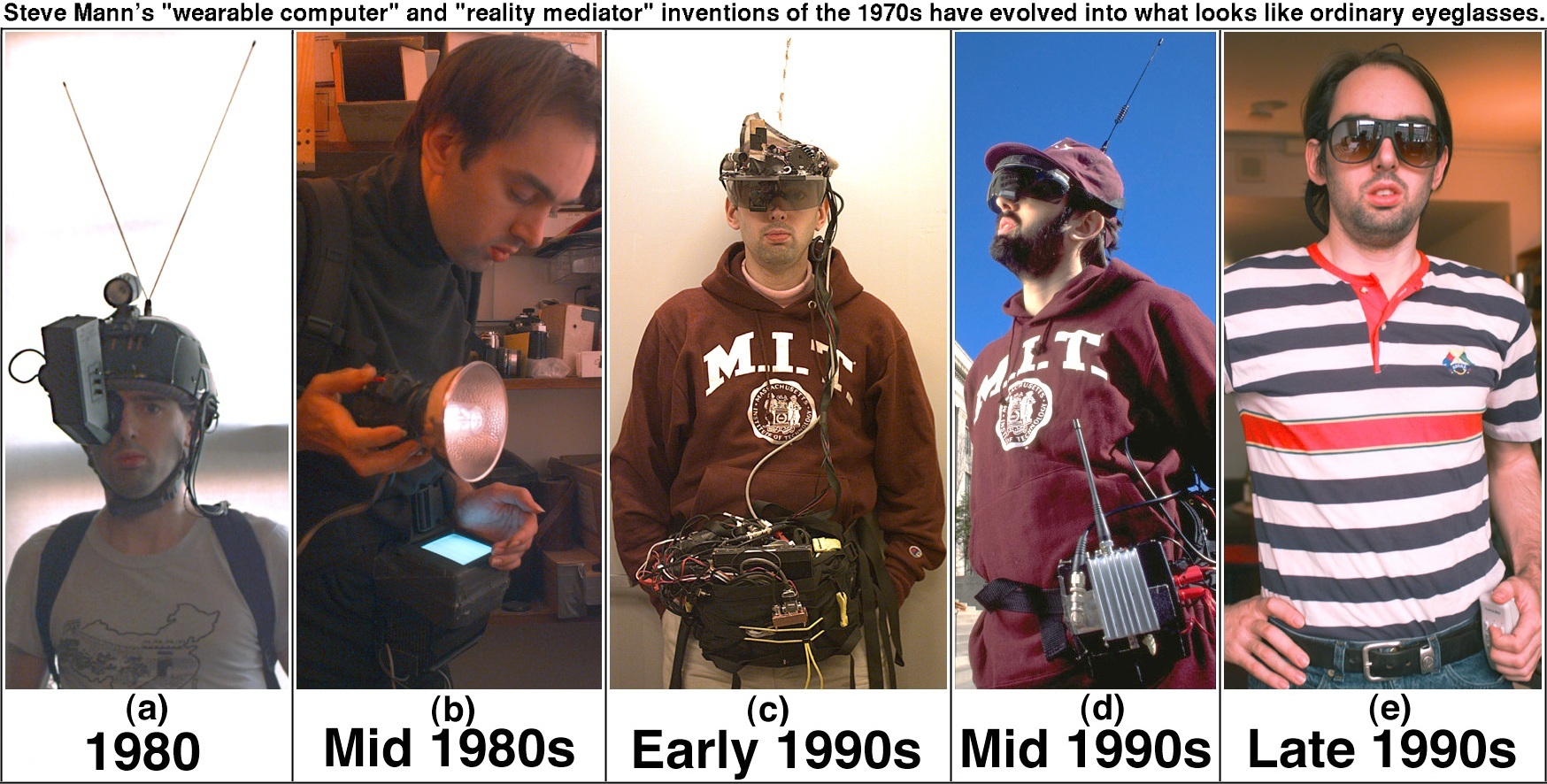
The Derrick de Kerckhove-hosted, Steve Mann-attended “What is Reality?” hot tub event that I mentioned earlier is not this Thursday, but the next one, the 14th. My bad.

You know, it serves me right for picking on Steve. If I always wore cyborg eyepieces constantly hooking me up to iCal or Palm calendar, I’d never get dates screwed up. I’ll bet MISTER CYBORG never misses an appointment…

Categories
Uncategorized

Nikon Coolpix SQ video experiment number one

Here’s a QuickTime video in which your ‘umble writer attempts to stay the name “Steve Mann” without following it up with a sarcastic “MISTER CYBORG”, enveloped in “sarcasm tongs”.

I tried, really I did.

But wow, is my new Nikon Coolpix SQ a really nifty camera!

Categories
Uncategorized

Room for rent

Would you like to live with two world-famous computer programmers? One of whom is one of Canada’s best-known accordion players and writes one of Canada’s Top ten blogs? The other being one of Canada’s best-known anti-censorship software designers? Living in one of downtown Toronto’s most televised houses? In an area giving you walking-and-biking distance access to some of Toronto’s coolest neighbourhoods?

It’s one of the nicest houses in a quiet residential neighbourhood tucked a mere couple of blocks away from the corner of Queen and Spadina. The facade is designated a historical landmark, but the interior is completely renovated, with hardwood floors and high ceilings in the common areas. There are two full bathrooms, with the downstairs one also being a laundry room with full-size washer and dryer. The kitchen has the full spread of stove, oven, microwave and dishwasher. There’s a back deck for barbecues and a large tree for shade.

Want to go see the latest blockbuster flick? We’re a five-minute walk from the downtown Paramount. Indie film more your cup of tea? We’re a five-minute walk from the Art Gallery of Ontario, and a quick bike ride away from the Cinecycle, Royal and Carlton cinemas. Like big bookstores? Chapters is close by. Like small ones? Pages is close by too. You can fall out of bed and land in Chinatown, Kensington Market or Queen Street West. Walk a litte farther, and you can hit College West, the dance Club district, the financial district, or the Eaton Centre. We’re a hop, skip and a jump away from the subway, and you can be on the Gardiner Expressway in minutes.

This is no bachelor cave; you will not find any milk-crate or cinder-block furniture here. I own the world’s most comfortable couches, and they’re pretty sharp-looking, too. There’s a Parsons table in the dining room and some real, non-reproduced art on the walls. We have eschewed plain old Bell DSL and Rogers Cable modem service and gone for the gusto with high-speed business DSL and I’ve set up an 802.11g open wireless access point.

We have a small bedroom that’s becoming available shortly. Perhaps you’re looking for a place in downtown Toronto. Perhaps this sort of place appeals to you.

The successful candidate will possess the following qualities:

  • Gainful employment or independent wealth. You must be able to cough up your share of the rent — CDN$525 — plus utilities — I estimate CDN$100 – $150 a month — and other expenses, which we will outline below.
  • A willingness to share in cooking and cleaning duties. We actually cook here. If your idea of dinner is microwaving burritos, you’re not going to cut it here. We split the grocery bill evenly — my guess is CDN$100 – $125 per person per month. We also keep a reasonably clean house, and we’d like you to help keep it that way.
  • You must act as if you live here. No more recluses. We’ve gone through two housemates who retreat to their room, emerging only to microwave burritos. I’m not saying that you have to be our bestest friend in the world, but you will have to socialize a little.
  • You will have to tolerate the occasional late-going party and a little noise. The record party for this house had 120 people in attendance; the last person left at 6:00 a.m. You’re also living with two music aficionados and four sound systems in the house. We’re reasonable with the noise, but you’re going to have to expect some.
  • You can smoke…outside.
  • Sorry, no cats. I’m allergic.

In return, you’ll live in a pretty cool house with two pretty cool housemates who make nice dinners, go out on the town reasonably often, make scintillating conversation, have interesting guests and generally live pretty well.

Interested? Drop me a line.