test post using NetNewsWire
Categories
test post using NetNewsWire
In a previous posting,
I covered an attempt to streamline the Blogware UI. Rather than state
my opinion on the change, I asked for yours, and got lots of responses,
all saying the same thing: bad idea.
Comments in Blogware now work this way…
If an entry has no comments, you’ll see this at the end of the entry:
If an entry has comments, you’ll see this at the end of the entry:
where n is the number of comments posted for the article.
You’ll still have to click on the permanent link for the article to see
the trackbacks, but we believe that comments are generally of more
interest to more people. The general idea is to stramline the
interface, making it a simple as possible, but no simpler.
Thank you for your feedback. It’s what helps us make our software better!
It’s a busy day for Yours Truly here at Tucows, where I’m doing all kinds of Blogware-related
stuff. Busy as I am, I still get the feeling I’m nowhere nearly as swamped as my nephew Nicholas,
who’s pictured below in a workstation that’s far cooler than mine:
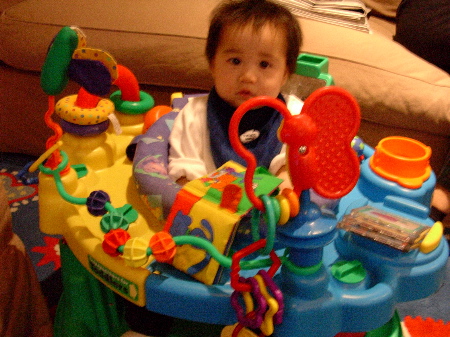
Memo to Boss Ross: I think we should get desks like these!
It only looks as if they’ve vanished. What’s happened is part of Boss Ross’ usability inititative for Blogware.
If an entry already has comments, you should see something like this at the end of that entry…
Comments: n | Permanent Link
…where n is the number of comments. You’d click on the n to jump to a page that contains only the entry, and specifically the part of that page which lists the comments.
If an entry has no comments, all you’ll see at the end of the entry is this:
To make a comment, you need to go to the page for the entry itself.
Click on either the Permanent Link at the end of the entry or the the 
icon that appears beside the entry’s title to see the page for that
entry. The page will contain the text of the entry, plus the usual
fields for making a comment.
Do you like this change? Let me know in the comments and I’ll pass it on to Boss Ross and the development team.
…details are over here.
If you’ve used Blogware over the past week or so, you might have
noticed a couple of changes to the page in which you enter text for
articles, photo descriptions and reviews.
The original editor worked the way most web-based blog editors do;
you’d enter your article, complete with HTML formatting. If you wanted
a an entry that looked like this…
Here’s some bold text, and here’s some italicized text.
And while we’re at it, here’s a picture of one handsome fella:

…you’d have to type in something that looked like this:
Here's some <strong>bold</strong> text,
and here's some <em>italicized</em> text.
<img
src="http://joeydevilla.com/wordpress/wp-content/uploads/2003/12/joey.jpg">
If you wanted to get a better idea of what your entry looked like, you’d click the Preview
button to see your formatting in action. If you didn’t like what you
saw, you’d go back to the edit page, type in some more HTML, go back to
the preview, and so on. This back-and-forth is time-consuming, annoying
and feels rather like being in stone age, especially if you’re used to
using a modern word processor. Wouldn’t it be nice if you could make
blog entries is a more WYSIWYG (What You See Is What You Get) way?
Blogware lets you do that now. Here’s a screen shot of the new rich
text editor as seen under Internet Explorer 6 and Windows XP:

Just so Mac users don’t feel left out (hey, I’m one too), here’s the same thing as seen using Mozilla and Mac OS X (“Panther”):

Just in case you’re feeling homesick for HTML source or need to use
some HTML formatting that isn’t covered by the controls offered, a
simple click of a button will take you from Display mode to Source mode:

For those of you using Windows, the rich text edior is available under Internet Explorer 6 and Mozilla 1.5.
Mac users who want to use the rich text editor should use Mozilla
1.5. It won’t work under Safari or Internet Explorer right now, but
we’re working on that.
Over the next couple of days, I’ll walk through the features of the
rich text editor and also show some tips and tricks. I’ll also be
updating the Blogware User Manual to cover the new rich text editor.
In the meantime, if you’re a Blogware user, give the new rich text editor a try!
(This entry also appears in the Blogware blog.)
Yup, it’s the beginning of a new year, which means that once again, I’m campaigning for a Bloggie.
The Bloggies are are publicly-chosen awards given to weblog writers and
those related to weblogs. The awards that I think I’m eligible for are:
Most Humorous Weblog
I
think that 2003 was a helluva year for the weblog, as it featured a
number of entries you’re certainly not going to find anywhere else. To
paraphrase the great actor Troy McClure, you may remember me from such 2003
entries as:
As well as earlier entries including:
Pretty
wild stuff. Can any other blogger boast these acheievemets?
Kottke
ever had to buy crablouse medicine for a friend?Doctorow
ever had a date end the evening screaming the the fetalposition?
Then again, I think Joi has, knowing him.
But that’s not the point. The point is that you get lots of entertainment bang for the no-bucks here at The Adventures of Accordion Guy in the 21st Century.
All I ask for in return in a Bloggie nomination. Give the above links a
read, and if you think I deserve a nomination, please head on
over to the Bloggie nomination page and nominate this blog!