Categories
Geek

Steve Mann on the IKEA incident

Hey, I got email from Steve Mann! Cool!

He wrote in response to the posting about my photography experience at IKEA. He tells me that the Thursday evening panel discussion that I mentioned in this posting is going to cover the issues of surveillance versus sousveillance — where surveillance is turned upside down and the watched watch the watchers — and matters related to public versus private.

Thanks for the heads-up, Steve!

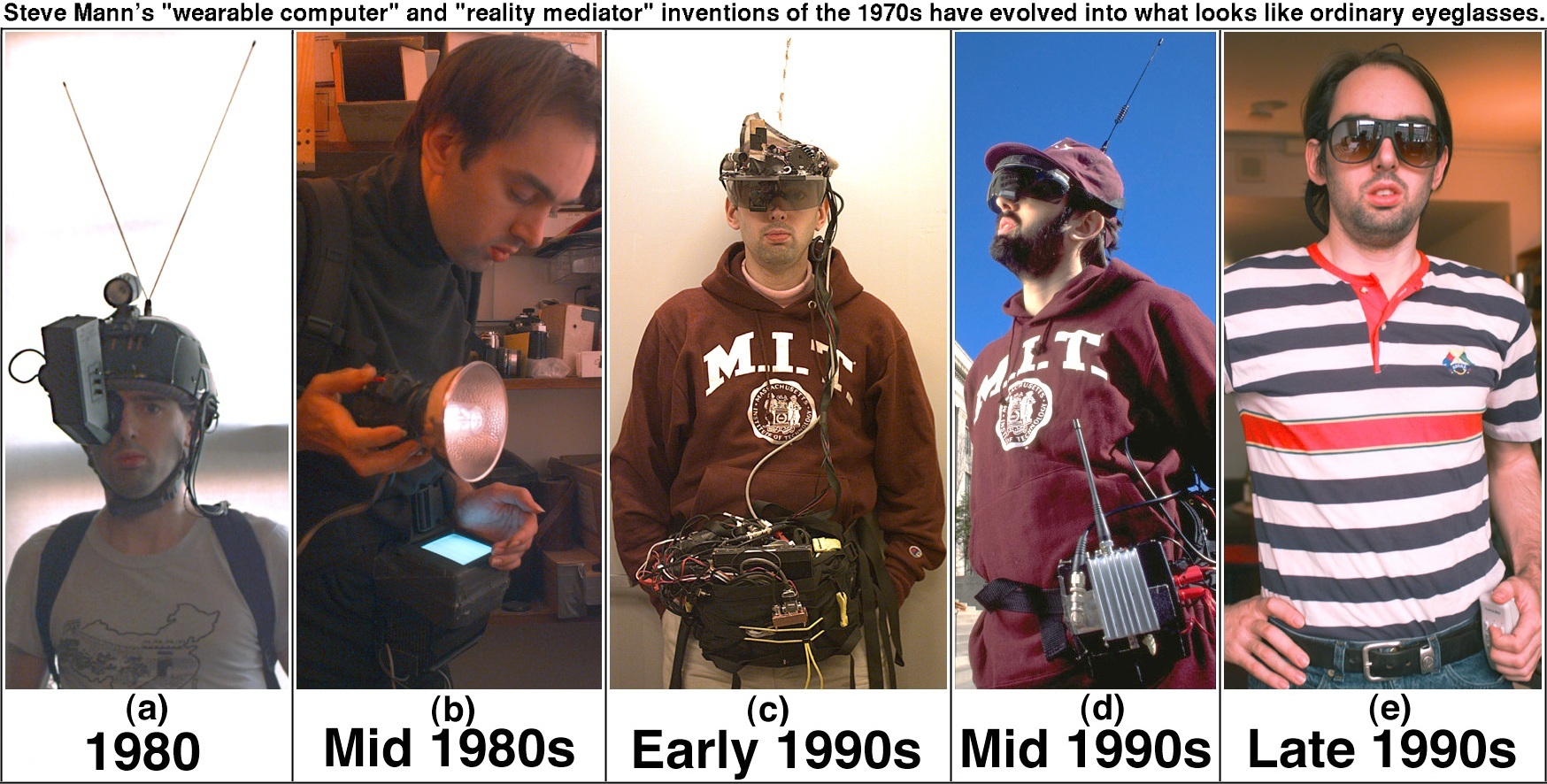
And double thank you for taking my “MISTER CYBORG” ribbing in the good-natured spirit in which it was intended. After all, who am I to talk? The present-day version of the rig he carries everywhere is less bulky and probably weighs a tenth as much as the accordion I carry everywhere.

(And as I take off my backpack and empty my pockets to change to dress up for tonight’s stag party for a friend, what do I see? In the backpack, a 12″ G4 Powerbook, power supply, Logitech MX500 mouse, spare power bar, small ethernet hub and power supply, USB ultra-bright LED reading light, USB hub. Ahem. In my pockets: Nikon Coolpix SQ camera, Samsung N370 cell phone, Mandylion password-memorizing/generating key fob, Handspring Visor Platinum, Planet Bike flashing ultra-bright LED bike light. Dammit, I may as well be a loosely-coupled cyborg myself.)

I extend a filet mignon on a flaming sword to the professor!

Maybe he’ll record the next Friday accordion video with me. The song I have in mind is Gary Numan’s Are “Friends” Electric?

Recommended Reading/Viewing

Steve Mann’s page on sousveillance. Who watches the watchers?

This is not “The Softer Side of Sears”. An MPEG video in which Steve asks Sears staff about their surveillance equipment. The whinging that the Sears staff do is quite something, and the way they react when they realize that they’re on camera is priceless.

Thanks to Steve Mann for the links!

Categories
Geek

"It is cloudy. You are likely to fly into a grue."

That new version of Flight Simulator must be really good, ’cause Scoble’s got it on the brain.

(I’ll probably pick it up. I said I was lowering my reliance on Microsoft-based stuff, not ditching it outright. But first, there’s Star Wars Galaxies, and I don’t dare touch that until I’ve got my freelance coding work off my plate.)

In a recent blog entry of mine, Getting pragmatic, part 1, I talked about what Andrew Hunt and Dave Thomas in The Pragmatic Programmer refer to as “The Power of Plain Text”. Scoble, in response to that part of my entry, writes:

I think I should be able to do more than just plain text on my computer. For instance, I wanna play some Flight Simulator (seen the latest version, it’s freaking awesome).

I wanna use my Tablet to write in ink. That ain’t plain text.

My friend built a system to run a Pistachio factory. That ain’t plain text.

It would appear that our wires are getting crossed. When I speak of plain text, I’m not talking about plain text interfaces, but plain text data formats:

  • Flight Simulator’s interface isn’t plain text, but the data files used to describe the “world” in which you fly might be, allowing third-party world-builders — yourself included — to create virtual worlds to fly in, real or imagined.
  • Same deal with the tablet — you write in ink, and perhaps your pen-strokes are saved, but the real data is the text that your handwriting represents.
  • As for the pistachio factory, the gui may be what the line controller sees, and bits over RS232 might be what the line machines “hear”, but the data — instructions to the line, settings, logs — could be stored as plain text.

That’s what I was talking about.

Hey, if I wanted plain text interfaces, I wouldn’t have paid the “Apple tax” and bought a Powerbook. I would’ve gotten an off-brand notebook, covered it with skateboard stickers and saved myself a lot of dough (and spared myself the trouble of having a life, too).

Of course it would be silly to make Flight Simulator a plain text game, although imagining it is fertile ground for a laugh:

> MAINTAIN COURSE

Your course remains unchanged, but you are approaching the point where you will be "handed off" to the flight control tower at Gander, Newfoundland, Canada. "Good," you think. "I'll annoy them by saying 'over and oot. Stupid Canuckleheads."

The stick feels a little sluggish today; you find yourself constantly arm-wrestling with it as the 737's nose insists on pointing downward. The pedals don't feel right, either. There's a bit of yaw to the right, and the crosswind isn't helping make things any easier.

Airspeed remains constant at 340 knots.

There is an exit to the aft.

There is a stewardess here.

> LOOK STEWARDESS

She's hot.

I’ll elaborate more on plain text and how it serves interoperability later.

Categories
Geek

Getting pragmatic, part 1

Going as Microsoft-free as possible

When it comes to computer religions — Mac OS vs. Windows vs. various Linuxen — I tend to be rather ecumenical, always preferring to pick what suits both me and the job. As a result, I get called a Mac zealot, Bill Gates sellout (especially since I made a living as a VB programmer for years) or Linux weenie by various parties.

I’m especially suspicious of knee-jerk Microsoft-bashing, and this is in spite of the fact that yes, sometimes Microsoft products will drive you crazy. Microsoft may not be original, but they’re pretty good at taking good ideas and turning them into mass-market products, sometimes pretty good ones at that.

I prefer a pragmatic approach. If a customer’s systems are based on a particular operating system, you develop stuff that will work on that OS. Back in my consulting days, I ended up writing custom “productivity software” — stuff that people in offices use — for customers who were running Windows. My business partner, a very rabid Mac-head kept trying to convince the customers to purchase a Mac version in spite of the fact that they had no demand for a Mac version and would double the development time. “But the Mac is better!” was pretty much his standard retort. While I do agree that the Mac experience is considerably more pleasant, a more pleasant experience that will never be experienced by your customer base is not an experience at all.

So, after all this preamble, it might seem strange that I would declare that I’m attempting to go as Microsoft-free as possible. However, it’s not politics or religion that led me to take this initiative, it’s interoperability. I’ve got three OSs on the go, my main machine is now a Mac, and I work for a company that sells Web services. “Interoperability and universality” is my mantra.

Microsoft products, by default, save their data in binary formats whose details are not generally known to the world outside the Redmond campus. You can, of course, save your files in less proprietary formats, but this approach is a pain for one or more reasons:

  • Oftentimes, you lose things like formatting. It makes one suspect that it’s their way to lock you into doing things their way.
  • The format is tainted with all sorts of extraneous Microsoft-specific junk. Try exporting a Word document as HTML and look at the junk that gets thrown in. It can look like crap on non-IE browsers.
  • Saving is painless, exporting is not. To save, you just hit “control-s” or “command s”. Exporting usually takes you to a dialog box, where you must exporting options.

The Pragmatic Programmer — it should be required reading for anyone who writes code — strongly encourages programmers to embrace plain text. It’s readable by humans, all present platforms and will be readable by future ones. Written properly, it has meaning, even when it is separated from the application that created it. It can also be crunched by simple utility scripts without having to resort to any translation magic.

Hence, I’m choosing applications that embrace The Power of Plain Text. I’ve listed the ones I’m currently using below.

  • Mail

    The Mail application that comes with Mac OS X is pleasant to look at, nice to work with, integrates with the Address Book app and has a pretty good junk mail filter. I’ve been working with it steadily since buying my 12″ G4 Powerbook a couple of weeks ago and have been pretty pleased with it.

  • Thunderbird

    I’ve also got Mozilla Thunderbird installed on my Powerbook, as well as the Linux (Red Hat 9, if you must know — the more hardcore of you can feel free to start hurling tomatoes) and Windows XP partitions of my Athlon 1500-based HP desktop computer at home. It’s a pretty good mail program — my boss Ross uses it — and I used it for a while when the HP was still my primary machine. I switched to Mail because it integrates very well with two other apps on the Mac: Address Book and iCal.

  • Address Book

    Address Book is a wonderful little app for keeping track of people. I love its three-pane format, where the first pane is categories of people, the second lists the people in the currently-selected category, and the third shows the currently selected person’s “business card”, complete with photo.

    The photo feature is great for remembering people whom you don’t know very well or with whom you’ve had only brief real-world contact. In my line of work — developer relations, which involves networking with other computer geeks — this is incredibly valuable. That, and the “notes” section, where you can keep write things like “This person’s significant other’s name is so-so”, “Big fan of this particular author”, “Allergic to peanuts” or “Avoid at all costs”, are incredibly useful to me.

  • iCal

    iCal is a pretty decent calendar, but it ran too slowly on my iBook (the 500Mhz dual-USB model) to be of any use. On the Powerbook, which has a G4 running at a higher clock speed and twice as much memory as the iBook, it runs at a decent speed. Once again, I’m using it because it integrates nicely with Mail and Address Book.

    I do have a gripe with iCal — it’s still a little buggy. Resizing an event on your calendar sometimes causes it to be stuck permanently in “resize” mode, and the only way to deal with it seems to be quitting the program. When you relaunch the program, the event you resized has vanished.

    Apple seems to be under no illusion that iCal doesn’t need work: it’s the only Apple app I’ve seen so far with a Provide iCal Feeback… item under its application menu.

  • OmniOutliner

    Whenever I do note-taking or scribble down design ideas, either by hand or on a computer, I tend to organize things hierarchically. This is especially true for programming; consider this condensed excerpt from my notes for the back end of an application I recently worked on:

    Stored Procedures

    • People
      • Add
      • Edit
      • Delete
      • Get people in booked in seminar x
      • Get person’s seminar attendance history
    • Seminars
      • Add
    • Bookings
      • Add

    When using a computer, I used to do this sort of thing in a text editor or word processor. With a text editor or word processor, you get the advantage of universality, but the contexts of different points — that is, which item belongs to which — is all in the formatting and not really part of the document. With Word’s outline tool, you get a document stored in a format that can’t be read by anything but Word. You might be able to get a script to read it too, if you invoked the right ActiveX magic.

    Thankfully, there’s OmniOutliner, a program that got bundled with Mac OS X. It’s a handy little outlining tool that can saves its outlines in XML and exports to a standard XML format called OPML (Outline Processor Markup Language) as well as clean non-Microsoft-tagged HTML or plain old text.

    There’s all kind of potential for a tool like this, from plain old note-taking, to building the skeleton of applications. I’ll have to write more about in a later entry.

  • BBEdit

    BBEdit is by far the best text editor out there, period. Oh, yes, you can play Tetris and Adventure in Emacs and compose open source haikus in vi, but it has what you expect from a programmer’s text editor, including multi-language syntax colouring, auto-indent, indenting/unindenting/tab-i-fying/de-tab-i-fying/multifile search and replace/regex-based search and replace and so on.

    If you want to get work done on something that feels like a Mac and not too concerned about getting geek cred while working on your computer in Mom’s basement, get BBEdit.

  • Emacs

    After pimp-slapping all the other text editors, I will say that my favourite 1970’s-flavoured text editor is Emacs. Introduced to me by my professor (and software engineering keeper-of-the-flame) David Alex Lamb at Queen’s (a.k.a. Crazy Go Nuts) University, I find its command structure and relative modelessness more comprehensible than vi (I write this as I don my vi-flame-retardant underwear).

    If you’ve got Mac OS X, you might be interested in these GUI versions of Emacs, meant to close the XEmacs gap.

  • OpenOffice

    Sooner or later, you’re going to be cranking out or reading someone’s TPS reports, and more often than not, they’ll be in some Microsoft Office format. You have two options: get your paws on Office, or get your paws on something that can read its hidden and ever-changing formats.

    OpenOffice does this, and presents you with a nice Office-like GUI. I haven’t had too much of a chance to take it for a test spin, but my housemate Paul, who’s cranking out docs for the next incarnation of Peekabooty, swears by it.

Categories
Geek

Oops, better make that NEXT Thursday

The Derrick de Kerckhove-hosted, Steve Mann-attended “What is Reality?” hot tub event that I mentioned earlier is not this Thursday, but the next one, the 14th. My bad.

You know, it serves me right for picking on Steve. If I always wore cyborg eyepieces constantly hooking me up to iCal or Palm calendar, I’d never get dates screwed up. I’ll bet MISTER CYBORG never misses an appointment…

Categories
Geek

Rub a dub dub, four nuts (or eight, depending on how you’re counting) in a tub

This Thursday at the DECONism gallery, there’s be a strange gathering in a hot tub — Derrick de Kerckhove, director of the Marshall McLuhan Program in Culture and Technology at the University of Toronto, will host a “What is real?” panel discussion featuring “post-post cyborg, performance artist and visionary Steve Mann as well as virtual reality artist Maurice Benayoun and the French cyberspace philosopher Pierre Levy.” According to the DECONism site, these gentlement will discuss “The topic of discussion will be fictitious truth, virtual fiction, realiction, and conjured reality.”

In my humble opinion, Steve and Derrick are probably two of the non-institutionalized/non-fundamentalist people least qualified to discuss reality. Then again, maybe they’re doing it as dispassionate outside observers. Levy doesn’t seem too crazy, and I like Benayoun’s art.

(I must confess. I’m quite incapable of saying “Steve Mann” without immediately following it by saying “Mister Cyborg” in a Homer Simpson-esque sarcastic voice, which making “air quotes”, a.k.a. “sarcasm tongs” with my fingers.)

The DECONism gallery is only a couple of blocks from my house, and hey, I’m a kinesthetic sort of accordion-playing guy who carries a lot of technology with him, so I’ll probably attend. Boris (a.k.a. “Bopuc” on the #joiito IRC channel at irc.freenode.net) might drive down from Montreal just to catch this.

Besides, I want to see if Steve’s cyber-implants short out or electrocute everyone in the tub.

Categories
Geek

WiFi Speed Spray

It’s the perfect gift for your gullible friend who can’t afford to switch to 802.11g.

Categories
Geek

Bruce Eckel interview at Borland’s Community site

Check out this Bruce Eckel interview at Borland’s community site. The interview’s all over the map, covering what you’d expect: C++, Delphi, Java, Borland’s IDEs, Java vs. C#, and of course, his new favourite language, Python. There’s also stuff you wouldn’t expect: his favourite song, his favourite movie, and whether he’d rather eat the fat from a moose’s eyeball or a Pop-Tart™ (really!).

In honour of tonight’s meeting of the pyGTA (Greater Toronto Area Python User Group), I’ll end with the most Pythonic quote from the article:

Saving the best for last [he discusses other programming languages just before this part], I’ve said in numerous places that Python is my favorite language, and this is because I’m most productive in that language. I can get so much more done in Python than in any other language I’ve encountered that it’s very hard for me to use those other languages, because to do so means throwing away time. Also, I’ve found the Python community to be my favorite group of language people; I can’t figure out how or why this is the case, but it retains the gentleness and enthusiasm that I most value in my interactions with a language community. I look forward to when I finally get my plate cleared enough that I can continue working on “Thinking in Python.”